
Web to Speech - Google Play
You'll be able to see results in few seconds.
Publisher Description
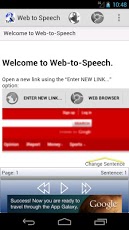
Web to Speech reads web pages using text-to-speech. Now you can catch up on light reading of articles, news, blog posts, or learn the basics of things listening to Wikipedia. Using Web to Speech while doing other activities like walking the dog or going to the gym frees up more of your time so you can be more productive, or have more time for leisure.Like Pdf-to-Speech, Web to Speech can play in the background like a media player. Web to Speech also uses Pdf-to-Speech's find/replace tool. A powerful tool that can be used to fix pronunciation errors, substitute acronyms, and obmit phrases.Web to Speech uses intelligent software to separate the content from the rest of the page. This means you only hear the news, the blog, or the wikipedia article without being distracted by unrelated text in the page.The text is highlighted on the website.The page must be public. Content for which you have to sign in cannot be processed yet.There are some known webpages that do not work yet. Among these areNYTimes.com and some Non-english articles.Websites that have been tested include:wikipedia.org ( Use the Desktop Wikipedia version for best results. You can switch to desktop version at the bottom of all Wikipedia pages)natgeo.combbc.comreuters.comtomshardware.comtechnologyreview.comwired.comcnn.comand many more...
About Web to Speech
The company that develops Web to Speech is Practical Apps. The latest version released by its developer is 1.0 .
To install Web to Speech on your Android device, just click the green Continue To App button above to start the installation process. The app is listed on our website since 2013-03-06 and was downloaded 0 times. We have already checked if the download link is safe, however for your own protection we recommend that you scan the downloaded app with your antivirus. Your antivirus may detect the Web to Speech as malware as malware if the download link to com.practicalandroidapps.webtospeech is broken.
How to install Web to Speech on your Android device:
- Click on the Continue To App button on our website. This will redirect you to Google Play.
- Once the Web to Speech is shown in the Google Play listing of your Android device, you can start its download and installation. Tap on the Install button located below the search bar and to the right of the app icon.
- A pop-up window with the permissions required by Web to Speech will be shown. Click on Accept to continue the process.
- Web to Speech will be downloaded onto your device, displaying a progress. Once the download completes, the installation will start and you'll get a notification after the installation is finished.
Program Details
System requirements
Download information
Pricing
Version History
version Varies with device
posted on 2013-03-06
version Varies with device
posted on 2013-03-06
Several fixes and updates
Disclaimer
Official Google Play Link
We do not host Web to Speech on our servers. We did not scan it for viruses, adware, spyware or other type of malware. This app is hosted by Google and passed their terms and conditions to be listed there. We recommend caution when installing it.
The Google Play link for Web to Speech is provided to you by apps112.com without any warranties, representations or guarantees of any kind, so access it at your own risk.
If you have questions regarding this particular app contact the publisher directly. For questions about the functionalities of apps112.com contact us.
